Hit the Road Dude AI

Choose the Right Car Window Filter for Hit the Road Dude AI
The trend lives inside the car window. These three filters sit closest to the look, and each one takes a single photo.
Key Features of Hit the Road Dude AI
Three Usgen features cover this trend. You start with a still you post tonight, and you can push the same idea into a short clip and a group shot.
Hit the Road Dude AI Filter Styles
Pick a filter instead of writing a prompt. Upload one photo or type a sentence. Choose from 25,000 style filters and get a car window image with your own face in it.
 Before
AI Video Generation From Photo
Turn a still into a moving clip. A photo to video filter keeps your face steady the whole way. New trending filters land daily, from Ghibli style animation to the AI hug effect.
Group Photo Engine Keeps Every Face Separate
Our multi person AI identifies and separates distinct facial features. A crew, a family or a couple can share one scene. Each face keeps its own shape instead of blending into the next.
How to Create a Hit the Road Dude AI Video?
Three steps on Android. Install Usgen on Google Play, pick a car window filter, then post your clip to your page.

Step 01.
Download Usgen on your Android phone from Google Play. Sign in once, and the whole template library opens inside the app you use from there.
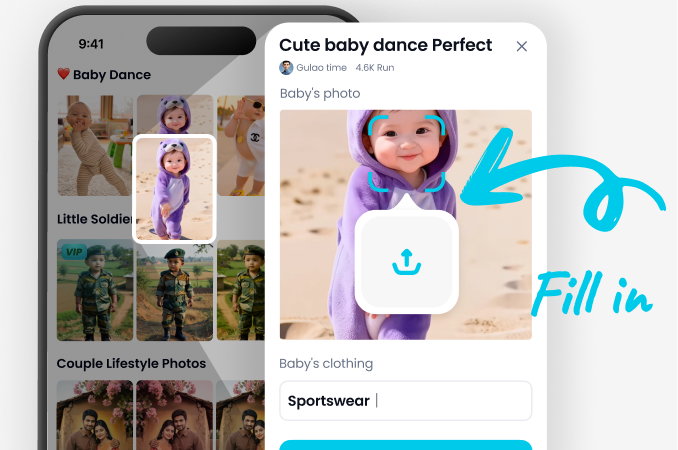
Step 02.
Choose the car window filter that matches your clip. Add one photo and tap Generate. A still takes about 10 seconds, and a photo to video run takes about 25.
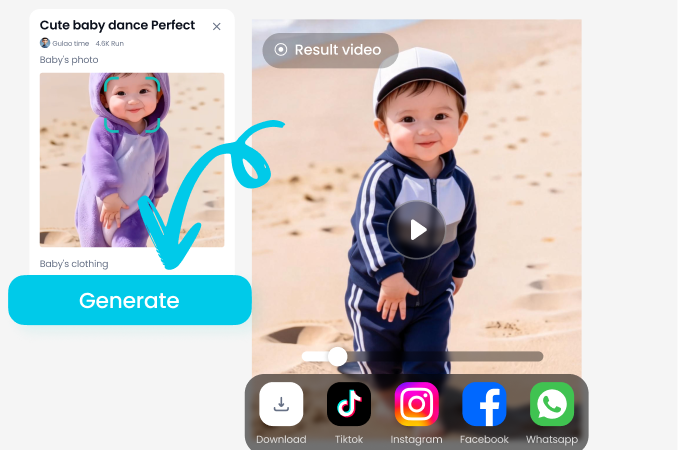
Step 03.
Save the image or video and share it to TikTok, Reels or WhatsApp. Publish it to your Usgen homepage, and other creators can reuse the same template for their own clip.
Watch the Usgen App in Action on YouTube
Two walkthroughs show the Usgen app from install to your first generated photo and video, ready to share on TikTok.
Use Usgen for Hit the Road Dude AI Videos
Unlike browser first tools, Usgen opens as an app and the template does the directing. You go from one photo to a posted clip in under a minute. If a render fails, your points return to your account automatically, and you can delete any upload from inside the app.

What Usgen Users Say About Hit the Road Dude AI
Try it on your lunch break, that is my honest advice.
I used to burn an hour fighting prompt boxes for every clip. Now I open Usgen, tap the car window filter, and my face is in the window in about 10 seconds.
Go with the pet version, it is the funniest one.
I posted a car window clip of my golden retriever and my whole clinic got tagged in. The face held up well, and I shared it straight from the app.
Usgen is the first one that handles my actual friend group.
I needed a group shot of four of us and could not find a tool that would keep them all. Usgen held all four in one frame, and each face still looked like itself.
Frequently Asked Questions
Everything about a car window clip for the Hit the Road Dude AI trend in Usgen, from one photo to a published post.
More Topics You May Like
More Usgen templates to try next, from Ghibli style animation and old photo revival to the AI hug effect.

Preview Bald Hair Style for Men with Gemini AI

Create Realistic AI Medium Shot Photos in Seconds

Create Stunning Gemini AI Astrophotography Art

Try Gemini AI Streetwear for Women Today
Preview Bald Hair Style for Men with Gemini AI
Create Realistic AI Medium Shot Photos in Seconds
Create Stunning Gemini AI Astrophotography Art
Try Gemini AI Streetwear for Women Today
Make Your Hit the Road Dude AI Video
Get Usgen on Google Play, choose a car window filter, and post your clip in under a minute.
Make Your Hit the Road Dude AI Video
Get Usgen on Google Play, choose a car window filter, and post your clip in under a minute.